
Getting started with immudb Development
This guide provides developers with the first steps of using immudb from their application and from their favourite programming language:
- Connect to the database
- Insert and retrieve data
TIP
To learn how to develop for immudb with Python in a guided online environment, visit the immudb Playground at https://play.codenotary.com
SDKs
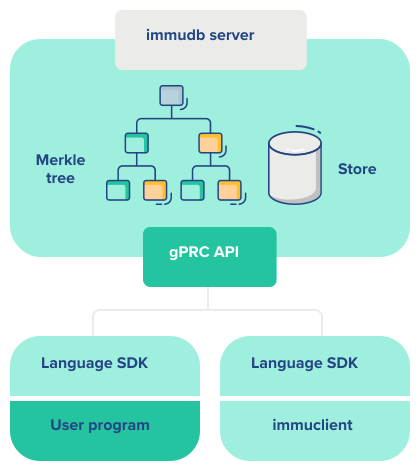
In the most common scenario, you would perform write and read operations on the database talking to the server. In this case your application will be a client to immudb.
SDKs make it comfortable to talk to the server from your favourite language, without having to deal with details about how to talk to it.
The most well-known and recommended immudb SDK is written in Golang, but there are other SDKs available, both maintainer by the internal team and by the community.
| Language | Maintainer | Immdb version | link | Notes |
|---|---|---|---|---|
go | immudb team | 1.2.1 | link | |
python | immudb team | 1.2.1 | link | Verification is not working |
JAVA | immudb team | 1.2.1 | link | Verification is not working |
.NET | immudb team | 1.2.1 | link | Verification is not working |
NODE | immudb team | 1.2.1 | link | Verification is not working |
JS | immudb team | 1.2.1 | link | Verification is not working |
ruby | Community (Ankane) | 1.2.1 | link | Verification is not working |
For other unsupported programming languages, immugw provides a REST gateway that can be used to talk to the server via generic HTTP.
The immudb server manages the requests from the outside world to the store. In order to insert or retrieve data, you need to talk with the server.
Connecting from your programming language
Importing the SDK
In order to use the SDK, you need to download and import the libraries:
:::: tabs
::: tab Go
# Make sure your project is using Go Modules
go mod init example.com/hello
go get github.com/codenotary/immudb/pkg/client// Then import the package
import (
immudb "github.com/codenotary/immudb/pkg/client"
):::
::: tab Java Just include immudb4j as a dependency in your project:
if using Maven:
    <dependency>
        <groupId>io.codenotary</groupId>
        <artifactId>immudb4j</artifactId>
        <version>0.9.0.6</version>
</dependency>if using Gradle:
compile 'io.codenotary:immudb4j:0.9.0.6'immudb4j is currently hosted on both Maven Central and Github Packages.
:::
::: tab Python Install the package using pip:
pip3 install immudb-pyThen import the client as follows:
from immudb import ImmudbClientNote: immudb-py need grpcio module from google. On Alpine linux, you need these packages in order to correctly build (and install) grpcio:
linux-headerspython3-devg++
:::
::: tab Node.js
Install the package using npm:
npm install immudb-nodeCodenotary Include the immudb-node as a dependency in your project.
const immudbClient = require('immudb-node')Codenotary Node.js SDK repository
:::
::: tab .Net
Use Microsoft's NuGet package manager to get immudb4DotNet.
Creating a Client.
- Using the default configuration.
var client = new CodeNotary.ImmuDb.ImmuClient("localhost"))- The immudb implements IDisposable, so you can wrap it with "using".
using (var client = new CodeNotary.ImmuDb.ImmuClient("localhost", 3322)){}::: tab Others If you're using another language, then read up on our immugw option. :::
::::
Connection and authentication
The first step is to connect to the database, which listens by default in port 3322 and authenticate using the default user and password (immudb / immudb):
Note: You can change the server default options using environment variables, flags or the
immudb.tomlconfiguration file.
:::: tabs
::: tab Go
import (
 "log"
 "context"
 immudb "github.com/codenotary/immudb/pkg/client"
)

opts := immudb.DefaultOptions().
            WithAddress("localhost").
            WithPort(3322)

client := immudb.NewClient().WithOptions(opts)
err := client.OpenSession(context.TODO(), []byte(`immudb`), []byte(`immudb`), "defaultdb")
if err != nil {
    log.Fatal(err)
}

defer client.CloseSession(context.TODO())

// do amazing stuff:::
::: tab Java
client = ImmuClient.newBuilder()
    .withServerUrl("localhost")
    .withServerPort(3322)
    .build();
client.login("immudb", "immudb");:::
::: tab Python
from immudb.client import ImmudbClient
ic=ImmudbClient()
ic.login("immudb","immudb"):::
::: tab Node.js
const ImmudbClient = require('immudb-node');

const cl = new ImmudbClient();

(async () => {
  try {
    const loginReq = { user: 'immudb', password: 'immudb' }
    const loginRes = await cl.login(loginReq)
// ...
} catch (err) {
    console.log(err)
  }
})()You can also use exported types in your TypeScript projects:
import ImmudbClient from 'immudb-node'
import Parameters from 'immudb-node/types/parameters'

const cl = new ImmudbClient();

(async () => {
  try {
    const loginReq: Parameters.Login = { user: 'immudb', password: 'immudb' }
    const loginRes = await cl.login(loginReq)
// ...
} catch (err) {
    console.log(err)
  }
})():::
::: tab .Net This feature is not yet supported or not documented. Do you want to make a feature request or help out? Open an issue on .Net sdk github project :::
::: tab Others If you're using another development language, please refer to the immugw option. :::
::::
Tamperproof read and write
:::: tabs
You can write with built-in cryptographic verification. The client implements the mathematical validations, while your application uses a traditional read or write function.
::: tab Go
vtx, err := client.VerifiedSet(ctx, []byte(`hello`), []byte(`immutable world`))
if err != nil {
    log.Fatal(err)
}

fmt.Printf("Set and verified key '%s' with value '%s' at tx %d\n", []byte(`hello`), []byte(`immutable world`), vtx.Id)

ventry, err := client.VerifiedGet(ctx, []byte(`hello`))
if err != nil {
    log.Fatal(err)
}

fmt.Printf("Sucessfully verified key '%s' with value '%s' at tx %d\n", ventry.Key, ventry.Value, ventry.Tx):::
::: tab Java This feature is not yet supported or not documented. Do you want to make a feature request or help out? Open an issue on Java sdk github project :::
::: tab Python This feature is not yet supported or not documented. Do you want to make a feature request or help out? Open an issue on Python sdk github project :::
::: tab Node.js This feature is not yet supported or not documented. Do you want to make a feature request or help out? Open an issue on Node.js sdk github project :::
::: tab .Net This feature is not yet supported or not documented. Do you want to make a feature request or help out? Open an issue on .Net sdk github project :::
::: tab Others If you're using another development language, please refer to the immugw option. :::
::::
SQL Operations with the Go SDK
In order to use SQL from the Go SDK, you create a immudb client and login to the server like usual. First make sure you import:
"github.com/codenotary/immudb/pkg/api/schema"
"github.com/codenotary/immudb/pkg/client"Then you can create the client and open a new session to the database:
import (
"log"
"context"
immudb "github.com/codenotary/immudb/pkg/client"
)

c := immudb.NewClient()
err := c.OpenSession(context.TODO(), []byte(`immudb`), []byte(`immudb`), "defaultdb")
if err != nil {
    log.Fatal(err)
}

defer c.CloseSession(context.TODO())

// do amazing stuffTo perform SQL statements, use the SQLExec function, which takes a SQLExecRequest with a SQL operation:
 _, err = c.SQLExec(ctx, `
  BEGIN TRANSACTION
          CREATE TABLE people(id INTEGER, name VARCHAR, salary INTEGER, PRIMARY KEY id);
          CREATE INDEX ON people(name)
  COMMIT
 `, map[string]interface{}{})
  if err != nil {
  log.Fatal(err)
}This is also how you perform inserts:
_, err = c.SQLExec(ctx, "UPSERT INTO people(id, name, salary) VALUES (@id, @name, @salary);", map[string]interface{}{"id": 1, "name": "Joe", "salary": 1000})
if err != nil {
    log.Fatal(err)
}Once you have data in the database, you can use the SQLQuery method of the client to query.
Both SQLQuery and SQLExec allows named parameters. Just encode them as @param and pass map[string]{}interface as values:
res, err := c.SQLQuery(ctx, "SELECT t.id as d,t.name FROM (people AS t) WHERE id <= 3 AND name = @name", map[string]interface{}{"name": "Joe"}, true)
if err != nil {
    log.Fatal(err)
}res is of the type *schema.SQLQueryResult. In order to iterate over the results, you iterate over res.Rows. On each iteration, the row r will have a member Values, which you can iterate to get each column.
for _, r := range res.Rows {
    for _, v := range r.Values {
        log.Printf("%s\n", schema.RenderValue(v.Value))
    }
}Additional resources
- Get the immudb-client-example code
