
App samples in Go
This section includes sample applications using immudb in Go.
Although the applications are simple, they will provide fully functional samples to demonstrate how to write an application using immudb.
Hello Immutable World
The classical Hello World sample adapted to immudb.
This simple application is using the official immudb go sdk to connect, store and retrieve key-value data from immudb server.
The full source code of this sample can be found at Hello Immutable World.
Prerequisites
In order to run this sample, immudb server must be already running. This step is quite simple and it's described at Running immudb.
Building and running the sample app
To build and run the sample application, simply clone the Hello Immutable World and run:
go mod tidy
go build
./hello-immutable-worldThe sample application will run and display an output similar to
Sucessfully set a verified entry: ('hello', 'immutable world') @ tx 1
Sucessfully got verified entry: ('hello', 'immutable world') @ tx 1WebApp using SQL
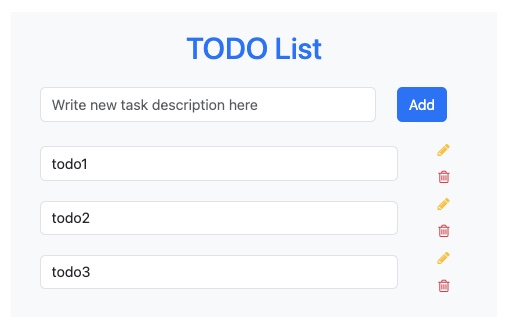
The purpose of this sample application is to demonstrate the use of immudb using Go standard APIs for SQL.
This sample was written taking as a basis the tutorial Building a simple app with Go and PostgreSQL. We followed the same application structure even though the source code is different to show how immudb and PostgreSQL can be used in analogy.
The full source code of this sample can be found at WebApp using SQL
Prerequisites
In order to run this sample, immudb server must be already running. This step is quite simple and it's described at Running immudb.
Building and running the sample app
To build and run the sample application, simply clone the sample repository and run:
go mod tidy
go build
./immudb-todo-webappThe sample application should be up and running now. The port 3000 is used by default unless a different one is specified using PORT environment variable e.g. PORT=3001 ./immudb-todo-webapp
TIP
Database initialization statements might be stored in an external file as in this sample sql initialization script.
Command line app using SQL
A simple reminder console app that stores all data in immudb.
As in the previous sample, the purpose of this sample application is to demonstrate the use of immudb using Go standard APIs for SQL.
The full source code of this sample can be found at Console sample using SQL.
Prerequisites
In order to run this sample, immudb server must be already running. This step is quite simple and it's described at Running immudb.
Building and running the sample app
To build and run the sample application, simply clone the Console sample using SQL and run:
go mod tidy
go build
./immudb-reminder-appThe sample application should be up and running now.
Additionally, this sample application provides a simple way to specify connection settings. run ./immudb-reminder-app -h to display all the available flags.
Usage of ./immudb-reminder-app:
  -addr string
        IP address of immudb server (default "localhost")
  -db string
        Name of the database to use (default "defaultdb")
  -pass string
        Password for authenticating to immudb (default "immudb")
  -port string
        Port number of immudb server (default "3322")
  -user string
Username for authenticating to immudb (default "immudb")TIP
Additional samples can be found at immudb client samples repository.
